Adding Custom Web Apps#
To extend e2xgrader you can add custom server apps to it. A custom server app can add templates, handlers and change the tornado settings of the jupyter server.
Different apps are activated in different modes. You can configure which apps should be activated in each mode via the TeacherExtension, StudentExtension and StudentExamExtension traits.
Creating a Simple App#
To create an app, you need to install e2xcore and extend the BaseApp class. As an example we will build a simple app that converts student score into letter grades.
The layout of the app is:
grade_converter
├── pyproject.toml
├── README.md
└── grade_converter
    ├── app.py
    ├── handlers.py
    └── templates
        ├── base.tpl
        └── convert_grades.tpl
The Basic App#
The app will display a page where you can convert a grade and respond with the letter grade. Let’s start by looking at the file app.py.
# File app.py
import os

from e2xcore import BaseApp, urljoin
from nbgrader.apps.baseapp import NbGrader

from traitlets import Dict, Unicode, Float
from traitlets.config import LoggingConfigurable

from .handlers import default_handlers


class GradeConverter(NbGrader, BaseApp):
    grading_scheme = Dict(
        key_trait=Unicode(),
        value_trait=Float(),
        default_value={
            "A+": 0.97,
            "A": 0.93,
            "A-": 0.9,
            "B+": 0.87,
            "B": 0.83,
            "B-": 0.8,
            "C+": 0.77,
            "C": 0.73,
            "C-": 0.7,
            "D+": 0.67,
            "D": 0.65,
            "F": 0.0,
        },
    ).tag(config=True)

    def __init__(self, **kwargs):
        NbGrader.__init__(self, **kwargs)
        BaseApp.__init__(self, **kwargs)

    template_path = os.path.join(os.path.dirname(__file__), "templates")

    def load_app(self):
        self.log.info("Loading the convert grades app")
        self.initialize([])
        # Add the grading scheme to the tornado settings
        self.update_tornado_settings(dict(e2x_grading_scheme=self.grading_scheme))
        self.add_handlers(default_handlers)
        self.add_template_path(self.template_path)
The grading scheme can be configured via the grading_scheme trait. e2xgrader will call the load_app method when loading the app. Here we first start by putting the grading scheme in the tornado settings, making it accessible anywhere. Then we add the handlers defined in handlers.py. Finally we add the templates.
The Handlers#
Let’s define the handlers next. The file handlers.py looks like this:
# File handlers.py
import json

from e2xcore import urljoin
from e2xcore.handlers import E2xApiHandler

from tornado import web
from nbgrader.server_extensions.formgrader.base import check_xsrf, BaseHandler


# Helper function to convert the percentage to a grade given a grading scheme
def convert_percentage_to_grade(percentage, grading_scheme):
    grade = ""
    for letter_grade, percent in sorted(grading_scheme.items(), key=lambda x: x[1]):
        if percentage < percent:
            break
        grade = letter_grade
    return grade


# Handler to convert percentage to letter grade
class ConvertGradeApiHandler(E2xApiHandler):
    def initialize(self):
        self.grading_scheme = self.settings["e2x_grading_scheme"]

    @web.authenticated
    def get(self):
        # Get the percentage argument and convert it to float
        percentage = float(self.get_argument("percentage"))
        # Respond with the converted grade
        self.finish(
            json.dumps(convert_percentage_to_grade(percentage, self.grading_scheme))
        )


# Handler to display the template defined in convert_grades.tpl
class ConvertGradeHandler(BaseHandler):
    @web.authenticated
    @check_xsrf
    def get(self):
        # Render the template, make sure to provide the base url here
        html = self.render("convert_grades.tpl", base_url=self.base_url)
        self.finish(html)

# Urls under which the handlers are exposed
default_handlers = [
    (urljoin("e2x", "convert", "api"), ConvertGradeApiHandler),
    (urljoin("e2x", "convert", "app"), ConvertGradeHandler),
]
Template#
If we want to create a link in the nbgrader formgrader sidebar, we have to change the base template base.tpl.
This template is located at e2xgrader/e2xgrader/server_extensions/apps/formgrader/templates/base.tpl.
We copy the template and change the lines concerning the sidebar:
...

{%- block sidebar -%}
  <li role="presentation" id="manage_assignments"><a href="{{ base_url }}/formgrader/manage_assignments">Manage Assignments</a></li>
  <li role="presentation" id="gradebook"><a href="{{ base_url }}/formgrader/gradebook">Manual Grading</a></li>
  <li role="presentation" id="gradebook_questions"><a href="{{ base_url }}/formgrader/gradebook?view=task">Manual Grading (Task View)</a></li>
  <li role="presentation" id="manage_students"><a href="{{ base_url }}/formgrader/manage_students">Manage Students</a></li>
  <li role="presentation" id="export_grades"><a href="{{ base_url }}/formgrader/export_grades">Export Grades</a></li>
  <li role="presentation" id="convert_grades"><a href="{{ base_url }}/e2x/convert/app">Convert Grades</a></li>
{%- endblock -%}

...
Next we define a very simple template in which we can move a slider to select the percentage and convert it with a click of a button.
{%- extends 'base.tpl' -%}

{%- block title -%}
Convert Grades
{%- endblock -%}

{%- block sidebar -%}
{{ super() }}
<script type="text/javascript">
    $('#convert_grades').addClass("active");
</script>
{%- endblock -%}

{%- block table_body -%}

<form method="get" id="gradeForm" action="{{ base_url }}/e2x/convert/api"/>
  <fieldset>
    <div>
      <label for="percentage">Percentage of the student (0.00-1.00)</label><br />
      <input type="number" name="percentage" id="percentage" min="0" max="1" step="0.01" />
    </div>
    <br/>
    <input type="submit" value="Convert Grade">
  </fieldset>
</form>
<div>
<h3 id="grade"></h3>
</div>

<script>
// Function to handle form submission
function handleSubmit(event) {
    event.preventDefault(); // Prevent the default form submission behavior

    const form = event.target;
    const percentage = form.elements.percentage.value;

    // Make the API call
    fetch(`{{base_url}}/e2x/convert/api?percentage=${percentage}`)
    .then(response => response.text())
    .then(data => {
        // Update the content of the h3 element with the API response
        const gradeSpan = document.getElementById("grade");
        gradeSpan.textContent = `Your grade is ${data}`;

        // You can also handle different responses or errors as needed
    })
    .catch(error => {
        console.error("Error fetching data:", error);
        // Handle error scenarios if necessary
    });
}

// Attach the form submission handler to the form
const gradeForm = document.getElementById("gradeForm");
gradeForm.addEventListener("submit", handleSubmit);
</script>
{%- endblock -%}
Make the App Installable#
Finally we need to add a pyproject.toml to make the app installable.
[build-system]
requires = ["hatchling"]
build-backend = "hatchling.build"

[project]
name = "grade_converter"
description = "An addon for e2xgrader that converts grades"
readme = "README.md"
requires-python = ">=3.8"
license = "MIT"
version = "0.0.1"
authors = [
{ name = "Tim Metzler", email = "tim.metzler@h-brs.de" },
]
dependencies = [
    "e2xcore",
]

[tool.hatch.build.targets.wheel]
artifacts = ["grade_converter/templates"]
Activating the App#
Once you are done, install your app locally by navigating to the directory with the pyproject.toml. Execute the following
pip install .
Now we need to activate the app in the nbgrader_config.py. We decide the app should be active in teacher mode.
# nbgrader_config.py

from e2xgrader.config import configure_base
from grade_converter.app import GradeConverter

c = get_config()
configure_base(c)

# Add the app in teacher mode
# We need to add it as the first app since we want to overwrite base.tpl
# If you give multiple directories with templates with the same name to jinja,
# the first one will take precedence.
c.TeacherExtension.apps.insert(0, GradeConverter)
You can try it out by starting the Jupyter notebook server and opening the formgrader tab. Then click on the “Convert Grades” link in the sidebar.
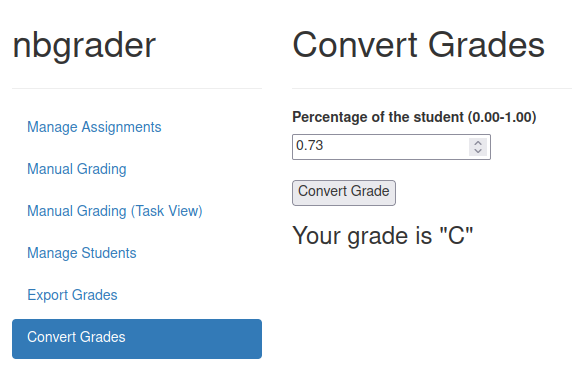
The GradeConverter app in action#
Configuring the App#
We can now easily change the grading scheme via the nbgrader_config.py.
# nbgrader_config.py

from e2xgrader.config import configure_base
from grade_converter.app import GradeConverter

c = get_config()
configure_base(c)

# Configure the grading scheme
c.GradeConverter.grading_scheme = {
  "great": 0.9,
  "good": 0.8,
  "okay": 0.7,
  "average": 0.6,
  "fail": 0.0
}

# ...