Exporting Student Grades#
After grading students, teachers often want to export the grades / score from nbgrader.

Exporting student grades#
To generate a csv file of all grades you can use the Export Grades features.
Options#
Depending on how granular the information you want to export should be, you choose three levels of export:
Show score per assignment: This sums up all scores per student for each notebook in an assignment
Show score per notebook: This gives you individual scores per student per notebook in an assignment
Show score per question: This gives you individual scores for each question the student answered
You have three options on how to display the score per student:
Do not add the maximum score: Only the score per student is exported.
Add a row with the maximum score: A new row with the maximum attainable score per assignment / notebook / question is added.
Divide all scores by the maximum score: Normalize the scores to lie in the range 0-1, where 1 is 100% of the score.
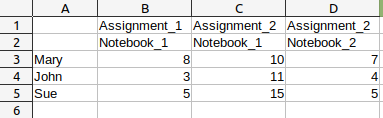
This is the result of the grade export on notebook level. There are three students (Mary, John and Sue) and two assignments (Assignment_1 and Assignment_2). The second assignment contains two notebooks.#

This is the result of the grade export on notebook level. There are three students (Mary, John and Sue) and two assignments (Assignment_1 and Assignment_2). There is one row showing the maximum score for each notebook.#

This is the result of the grade export on notebook level with the option Divide all scores by the maximum score checked. Notice how each score is normalized.#